

What is an alt tag and how should I use it?
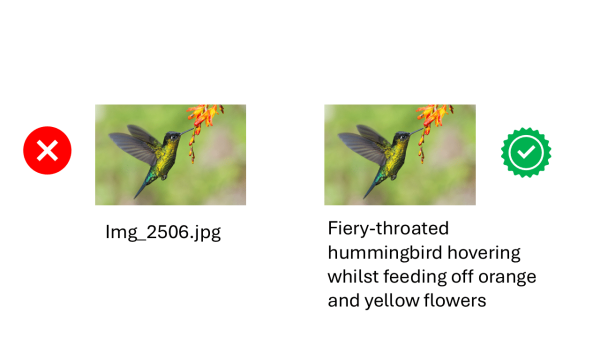
Alt tag is the phrase many people use for the alternative description attached to an image, while alt text is the wording contained inside the HTML alt attribute. The technical distinction matters, although the practical purpose matters far more: people who cannot see an image should still be able to understand the information or function it provides.
Images can make a website clearer, warmer and more memorable. They can show products, explain processes, introduce staff, present data and communicate emotions that would be difficult to convey in a short paragraph. They can also create a serious barrier when the important information they contain is available only to people who can see them.
A blind person using a screen reader does not receive the visual information automatically. The software relies on the page code, the surrounding content and the description supplied by the content author. A useful description can make the image meaningful. A missing, vague or irrelevant description can leave the visitor confused, or force them to guess why the image was included.
This guide explains what the attribute does, how to write useful descriptions for different types of images, when an empty value is correct and how image descriptions can support search visibility without becoming a dumping ground for keywords.
What Is An Alt Tag And Why Does It Matter?
The expression is widely used, although it is not technically the name of an HTML tag. The image itself is created with an <img> element. The alternative description is placed inside its alt attribute.
A simple example looks like this:
<img src="guide-dog.jpg" alt="Black guide dog resting beneath an office desk">
The wording inside the attribute is the text alternative for the image. Many website editors never see this code because WordPress and other content management systems provide a field where the description can be entered. The platform then creates the underlying markup.
A useful alt tag should communicate the meaning or purpose of the image rather than provide a literal inventory of every visible object. Alt text should replace the important information somebody would otherwise miss.
WCAG 2.2 Success Criterion 1.1.1 requires non-text content to have a text alternative that serves an equivalent purpose, apart from defined exceptions. This is a Level A requirement, which means it sits at the most fundamental level of the Web Content Accessibility Guidelines.
The goal is not to make every image produce speech. The goal is to ensure that the information or function is available in another form. That distinction explains why some images need a meaningful description, while purely decorative images should normally have an empty value.
Access To Information
Consider a photograph showing flooding outside the entrance to a community centre. The surrounding article may explain that an event has been cancelled, but the photograph might show the depth of the water and the blocked access route.
A description such as Flood water covering the steps and wheelchair ramp outside the community centre communicates the important visual information. A description such as Building does not.
Useful alt text concentrates on the reason the image has been included. The same principle applies to product photographs, diagrams, screenshots and photographs of people. The author must decide which visual information contributes to the purpose of the page.
Access To Functions
Images are sometimes used as links, buttons or controls. In those situations, the description should communicate what the control does rather than what the picture looks like.
A magnifying glass used as a search button should be announced as Search, not Magnifying glass. A printer icon that starts a print action should communicate Print this page. A company logo that links to the home page should communicate the destination.
Describing only the appearance forces the user to work out the function. Sighted visitors do not have to solve that puzzle, so screen reader users should not have to solve it either.
An Empty Value Can Be Correct
A decorative flourish, background texture or stock photograph that adds no information should not interrupt the reading experience. In those circumstances, the correct markup is often alt="".
An empty attribute is deliberate. A missing attribute is not the same thing. When the attribute is absent, some screen readers may announce the filename or image address, which can produce a delightful contribution such as IMG 4827 final final new two.jpg. Nobody requested that performance.
How An Alt Tag Works With Screen Readers
A screen reader converts digital information into synthesised speech or braille. It does not understand an image in the same way as a sighted person. It interprets the accessible information exposed by the browser and the page code.
When the image has a useful description, the software can announce it as part of the surrounding content. When the image is a link or button, the description helps identify the purpose of that control. When the value is intentionally empty, the software can normally move past the image without adding unnecessary noise.
The alt tag does not work in isolation. Page structure, link wording, captions, nearby paragraphs and the way the image is coded all affect what the visitor receives. A technically present description can still be poor if it repeats nearby content, contains irrelevant marketing language or fails to explain the image purpose.
What Happens When The Description Is Missing?
The result varies according to the browser, screen reader and context. The software may announce a filename, part of a web address or nothing useful at all. A linked image can be especially confusing because the visitor may hear an unexplained destination without knowing what action is available.
When alt text is missing, automated accessibility checkers can usually identify the absent attribute. They cannot reliably decide whether existing wording is useful. A field containing picture, image123 or a list of keywords may pass a basic presence check while still providing a dreadful experience.
Why Context Matters More Than Object Recognition
Modern software can often identify people, objects, colours and locations inside an image. That can help produce a first draft, but object recognition does not explain why the image appears on a particular page.
A photograph of a person using a laptop might appear in an article about remote working, accessible software, cybersecurity, staff training or office furniture. The pixels remain the same. The relevant meaning changes with the page.
The content author must connect the visible scene with the purpose of the surrounding material. That is why automatic descriptions always need human review.
Descriptions Should Fit The Reading Flow
A description is heard as part of the page, not as an isolated writing exercise. Repeating the heading, caption and paragraph can make the experience tedious. Adding every colour, item of clothing and piece of furniture can bury the important point.
Good alt text should sound like a natural contribution to the content. Reading the page aloud is a useful check. The wording should not sound like a stock photography database has wandered into the conversation carrying a clipboard.
What Happens When Images Do Not Load?
Images can fail to appear because of a broken link, slow connection, browser setting or temporary technical problem. The description may then be displayed in place of the missing image or remain available to assistive technology.
A useful description can help visitors understand what should have appeared. This benefit is secondary to accessibility, but it demonstrates why meaningful wording is better than filenames and generic labels.
The description should not attempt to compensate for every possible technical failure. It should still communicate the intended information or function of the image within the page.
How To Write An Alt Tag For Different Images
There is no universal sentence pattern that works for every image. The correct alt tag depends on whether the image is informative, functional, decorative, complex or contains important words.
The W3C image tutorials divide images into useful categories because each category serves a different purpose. The decision should be based on the role of the image within the page, not merely on what the image depicts.
Informative Images
An informative image communicates a simple idea, fact or impression that can usually be expressed in a short sentence or phrase.
Example page context: an article about an inaccessible railway station.

Poor description:
Station
Better description:
Flight of steps leading to the only platform entrance, with no lift or ramp
The better version communicates the barrier shown by the photograph. It does not waste time describing the weather, brick colour or number of windows unless those details matter to the article.
Product Images
Product descriptions should help a customer distinguish the item and understand relevant visual details. Colour, style, orientation, pattern and visible features may all matter.
Example:
Dark green waterproof jacket with a detachable hood and two zipped front pockets
Product alt text should vary when different photographs show different information. A rear view, close-up fastening or interior pocket may need its own concise description rather than repeating the same product name across every image.
The product name and price may already appear beside the image. Repeating all of that information can be unnecessary unless the image functions as a link and needs an accessible name.
Photographs Of People
Descriptions of people require judgement. Identity, activity, expression, clothing, setting and visible access aids may all be relevant. Subjective comments and unverified assumptions should be avoided.

A staff portrait could use:
Sarah smiling, with shoulder-length dark hair and red framed glasses
A service photograph could use:
Mede testing an online form with a screen reader and headphones
Alt text for people should focus on the information that contributes to the page. The second example concentrates on the activity because that is the reason the photograph has been included.
Our supporting article gives more detailed guidance on writing descriptions for photographs of people.
Functional Images
A functional image starts an action or takes the visitor somewhere. The description should explain that function.

Poor description:
Search Icon
Better description when used as a link:
Email the customer support team
If the envelope icon appears beside a visible link saying Email the customer support team, the image itself can usually be treated as decorative. Repeating the same wording twice would add clutter.
Images Containing Text
Important words shown inside an image must be available as real text or through an appropriate text alternative. The better solution is usually to place the wording in HTML so it can be resized, selected, translated and adapted.
A poster advertising an event may contain the event name, date, venue and booking details. A short image description cannot always carry all of that information gracefully. Place the complete details beside the image and keep the image description concise.
Logos are a common exception because the stylised wording may be the information the image provides. A company logo can normally use the organisation name. When the logo links to the home page, the accessible name should make the destination clear.
Logos And Brand Images
A logo identifies an organisation, product or service. The text alternative should normally provide that identity rather than describe the colours, shapes and typography.
A logo for Access by Design could therefore use:
Access by Design
A linked logo at the top of a website often leads to the home page. The accessible name may need to communicate both the organisation and destination, depending on the surrounding context.
Repeated logos in a footer, accreditation panel or list of clients may need different treatment. A client logo can be informative when it identifies the organisation. A logo repeated beside the same visible organisation name may be decorative.
Brand slogans embedded in an image should not be lost. Place the slogan in real text where possible, or include it when it carries information that is not provided elsewhere.
Screenshots
A screenshot can demonstrate an interface, document an error or show a sequence of actions. The description should explain the relevant part rather than transcribe every menu, button and label.
A screenshot used in an accessibility report might use:
Checkout form showing an error message identified only by a red border
The surrounding report should explain the full issue, user impact and recommended correction. The image description provides orientation rather than attempting to contain the entire finding.
Sensitive information must be removed before screenshots are published. Names, email addresses, account details and private messages should not be exposed through either the visible image or its description.
Charts, Diagrams And Complex Images
A complex image often contains more information than a short phrase can communicate. Charts, maps, technical diagrams and infographics may need a brief summary plus a detailed explanation or data table nearby.

A bar chart description could begin:
Bar chart showing customer complaints falling each month from January to June
The nearby text or table should then provide the exact figures and important comparisons. Trying to squeeze a complete dataset into one attribute creates a difficult listening experience and makes the information harder to maintain.
When An Alt Tag Should Be Empty
One of the most persistent myths is that every image needs a written description. Decorative images need the attribute, but its value should normally be empty.
The markup is:
alt=""
Empty alt text tells assistive technology that the image does not add information and can be skipped. The decision reduces audible clutter and keeps the visitor focused on the content that matters.
Pure Decoration

Borders, flourishes, background shapes and atmospheric photographs may exist only to support the visual design. Describing them can make a simple page painfully long.
A decorative image should not receive a token description such as blue swirl merely to satisfy an automated checker. That wording adds no value and may distract from the surrounding subject.
Repeated Information
An image may repeat information already provided in nearby text. A phone icon beside a visible telephone number, an envelope beside an email address or a portrait beside a complete caption may not need to be announced separately.
The important question is whether a visitor loses information when the image is skipped. An empty value is appropriate when the answer is no.
Decorative Images Inside Links
An image inside a link may be decorative when useful link wording is already present.
For example, a visible link may contain a small PDF icon followed by the words Download the annual report. The icon can be empty because the link wording already explains the action and file.
A linked image without visible wording is different. It needs an accessible name that communicates the destination or action.
Missing Is Not Empty
The attribute should still be present. Leaving it out can cause assistive technology to announce the filename, address or other unhelpful information.
WordPress allows an image to be marked as decorative in the media settings. Content editors should use that option thoughtfully rather than leaving the description field blank and hoping the platform guesses the intention.
Our comparison article explores real examples of appropriate image descriptions, including an overlong stock image description, a filename and an intentionally empty value.
How An Alt Tag Supports SEO Without Keyword Stuffing
Search engines use image descriptions alongside computer vision, page content and other signals to understand an image and its relationship to the page. An accurate alt tag can therefore reinforce the subject of useful content without turning the attribute into hidden advertising space.
Alt text can help Google understand the image and how it relates to the surrounding page. That potential search benefit should come from accurate, relevant information rather than manipulation.
Google specifically warns against filling image descriptions with keywords because it creates a poor experience and may make a website appear spammy. Phone numbers, town names, service lists and repeated sales phrases should not be attached to unrelated images.
Describe The Image Honestly
A useful description can include a relevant search phrase when that phrase genuinely explains the image.
An image showing a blind tester completing a website accessibility audit could reasonably be described as:
Blind tester reviewing a website accessibility audit with a screen reader
The wording is relevant to the visible activity and the page subject. Adding unrelated phrases such as affordable web design Chichester, accessible ecommerce and free consultation would be keyword stuffing dressed in a tiny technical hat.
Use Helpful Filenames And Surrounding Content
Image search optimisation is not controlled by one field. Google also considers the filename, surrounding content, page title and broader context.
A descriptive filename such as blind-screen-reader-tester.jpg is more useful than DSC00482.jpg. The filename should remain concise and accurate. It should not become a chain of every keyword the business wishes to rank for.
The paragraph beside the image should explain the subject naturally. Captions can add context when they genuinely help readers. Strong page content will do far more than trying to force search phrases into each photograph.
Use Captions When They Add Context
Captions are visible to everybody and are often read more frequently than surrounding body copy. They can identify people, explain a moment or connect an image to the article.
A caption and image description serve different purposes. The caption can provide commentary or background. The alternative description replaces visual information that would otherwise be unavailable.
Repeating an identical caption may not help, particularly when the caption is already associated clearly with the image. The description can communicate any important visual information not included in the visible wording.
Search engines can use the nearby caption and page content as contextual signals. This is another reason not to cram the entire optimisation strategy into one attribute.
Do Not Sacrifice People For Rankings
The description exists first to provide equivalent information. Any search benefit should come from accuracy and relevance.
Stuffing alt text with repeated search phrases creates noise for screen reader users and undermines the purpose of the attribute.
An old article on this website once recommended adding a telephone number to every image description to strengthen local signals. That advice was wrong. It created repetition and treated an accessibility feature as a secret SEO field.
Professional practice should change when evidence and understanding improve. Search engines increasingly emphasise useful content, while accessibility has always required us to consider the person receiving it.
The current Google image SEO guidance explains that search engines use image descriptions and page context together, and warns against keyword stuffing.
How To Check An Alt Tag Before Publishing
The strongest alt tag begins with purpose rather than word count. There is no official maximum length that makes a description automatically good or bad. Concise wording is normally easier to understand, but a complex subject may need more information elsewhere on the page.
Strong alt text should communicate the relevant meaning without repeating nearby information or burying the main point beneath unnecessary detail.
Use the following process before publishing an image.
- Decide why the image is present.
- Identify the information or function a person would miss without it.
- Check whether that information is already available nearby.
- Decide whether the image is informative, functional, decorative or complex.
- Write the shortest description that communicates the relevant meaning.
- Remove subjective judgements, guesses and unnecessary visual detail.
- Check that linked images describe the action or destination.
- Use an empty value for images that add no information.
- Review automatic descriptions before publication.
- Test important pages with assistive technology and disabled users.
Check For Common Mistakes
Common problems include vague wording, filenames, repeated captions, keyword lists and descriptions that begin with image of or picture of when the software already announces the element as an image.
Those opening words are not forbidden. They may occasionally help when the format itself matters, such as identifying a painting, diagram or screenshot. They are usually unnecessary for an ordinary photograph.
Another common mistake is describing an image that should be empty. More speech does not equal more inclusion.
Add Descriptions Carefully In WordPress
WordPress provides several fields when an image is uploaded, including alternative text, title, caption and description. These fields are not interchangeable.
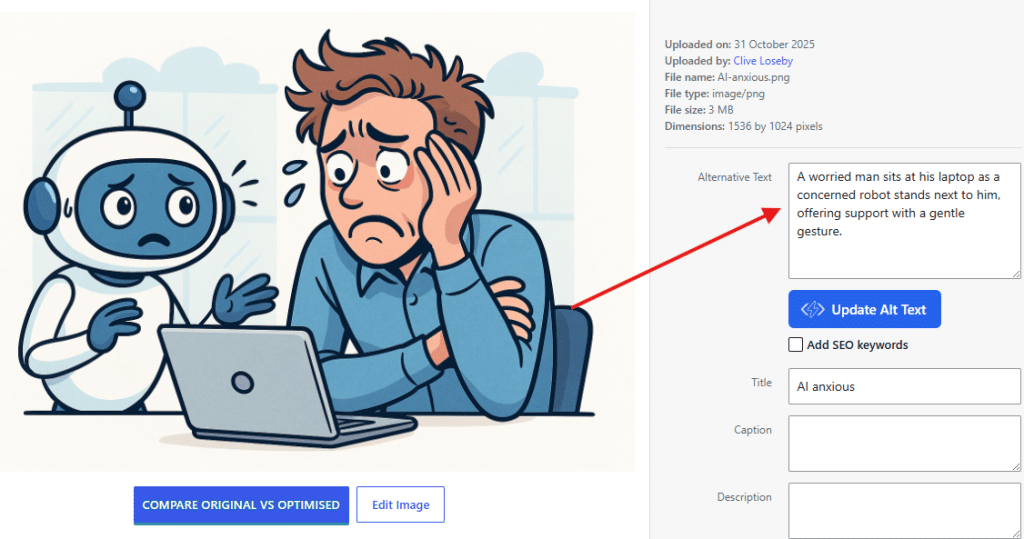
The alternative description supplies the accessible replacement for the image. The caption appears visibly beneath it when the theme supports captions. The media title helps identify the file inside WordPress but does not automatically provide an accessible replacement. The description field may appear on attachment pages, depending on the website configuration.
Do not copy the same wording into every field simply because the boxes are available. Each field has a different purpose.
When an existing image is reused, reconsider the wording in its new context. WordPress may carry the previously saved description into another page even when the purpose has changed.
A photograph originally uploaded for a staff biography may later be used in an article about screen reader testing. The relevant description may be different. Media library convenience should not replace editorial judgement.
Decorative images should be marked deliberately. Leaving a field blank without checking the resulting markup can produce a missing attribute rather than the intended empty value, depending on the theme, block or plugin.
Use Automated Tools Carefully
Automated testing can identify missing attributes and some suspicious values. Artificial intelligence can suggest descriptions. Neither can reliably judge the page purpose, the accuracy of assumptions or the quality of the complete user experience.

A generated description may identify a group of people sitting around a table. A human editor must decide whether the important point is a board meeting, an accessibility workshop or friends sharing lunch.
The tool supplies possibilities. The content author remains responsible for the published result.
Test Important Journeys With Real People
A professional review should go beyond checking whether every field contains something. The reviewer must ask whether the descriptions help people understand and complete the page purpose.
At Access by Design, our website accessibility audits combine technical assessment with testing by disabled people who use screen readers, voice recognition, keyboard navigation and personalised display settings in everyday life.
The lived experience matters. A description that appears acceptable to a sighted editor may be repetitive, confusing or irrelevant when heard in context.
The W3C image decision tree offers a useful starting point. Real testing shows whether the decision works on the finished page.
Keep The Process Simple
Content editors do not need to write miniature works of literature for every upload. They need to pause, understand the purpose and choose the wording deliberately.
A good description may be 5 words. It may be a short sentence. A chart may need a summary and a nearby table. A decorative photograph may need silence.
The correct choice is the one that gives people equivalent access without unnecessary clutter. That principle sits at the heart of meaningful website accessibility.
That is the real purpose of alt text. It is not glamorous, and nobody has ever launched a fireworks display because an image attribute was written properly. It can still be the difference between understanding a page and being excluded from it.
Clive Loseby
Access by Design



Would you like to speak with people
who understand inclusive web design?
Whether you are planning a new website, reviewing an existing platform or trying to understand your accessibility obligations, we would love to help.
Please get in touch to discuss your project, accessibility goals or digital challenges.