

What Should Be In Alt Text For Photos Of People?
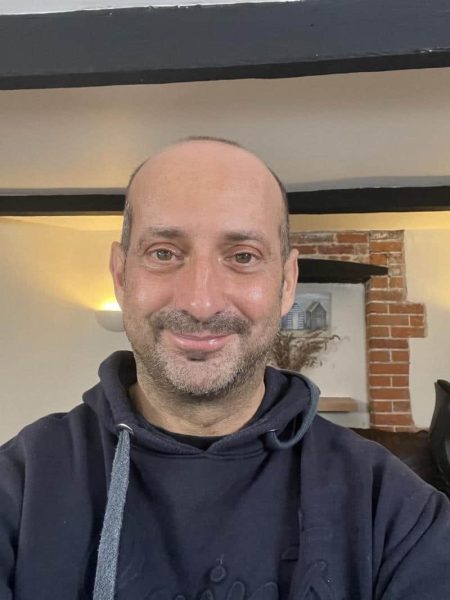
Alt text for photos of people should communicate the visual information that matters in the context of the page. That may include what somebody looks like, what they are doing, their expression, their clothing or the setting around them. It should not become a collection of assumptions, subjective judgements or unnecessary personal details.
The right description will depend on why the photograph has been included.
A formal staff portrait, a photograph from an event and an image showing somebody using a service all have different purposes. Describing every photograph in exactly the same way would overlook that context.
Alternative text is sometimes described as an alt tag, although technically it is text placed inside the alt attribute of an image.
Our main guide explains what an alt tag is and how it should be used.
This article focuses on one of the more difficult questions: what should we say when the image contains a person?
What Alt Text For Photos Of People Should Do
A useful description should give somebody who cannot see the image access to the information or impression that the photograph contributes.
That does not always mean describing every visible detail. It means understanding the reason the photograph is there.
Imagine that you are explaining the page to somebody over the telephone. Would you mention the photograph? What would you say about it? Which details would help the person understand the page, and which would merely delay them?
The W3C guidance on accessible images and text alternatives explains that the description should reflect the purpose, content and context of the image.
A photograph can serve several different purposes.
- It may identify a named member of staff.
- It may demonstrate a product, service or activity.
- It may show the atmosphere of an event.
- It may communicate an emotion or personal story.
- It may illustrate diversity within a team or community.
- It may simply make the page look more visually interesting.
The last example is important. If a photograph is genuinely decorative and adds no information beyond the surrounding text, an empty alt attribute may be the right choice.
More words do not automatically mean better access.
Alt Text Is Not The Same As A Caption
A caption is visible to everybody and can add background, commentary or context. Alternative text is provided when somebody cannot access the image itself.
The two may contain similar information, but they do not always need to repeat one another.
If a staff photograph already has the visible caption Sarah Ahmed, Finance Director, the description does not usually need to repeat those words unless the image performs a separate function.
The alternative text could describe Sarah visually if that information is part of the reason the photograph is present. It could also be empty if the image is simply decorative and the visible text already provides everything the visitor needs.
Alt Text Should Not Become A Biography
A profile photograph does not need to contain the persons job history, qualifications, personality and favourite sandwich.
That information belongs in the visible profile.
The description should concentrate on the relevant visual information. A short sentence is normally enough for a straightforward photograph.
A Live Accessibility Audit Changed My Thinking
I began thinking more deeply about this during a live website accessibility audit with Mede, one of our blind testers.
Mede developed a degenerative eye condition during childhood. She remembers visual concepts and has her own preferences about the information she finds useful when photographs are described.
We were reviewing an About Us page containing a series of staff photographs. None of the images had alternative text, so I began describing each person aloud.
I initially found myself reaching for the information already written below each photograph.
Head of Communications. Managing Director. Finance Manager.
Mede explained that she already had access to those job titles. She was more interested in gaining a sense of what each person looked like.
I began describing hairstyles, hair colour, glasses, clothing and expressions.
The process immediately raised more questions.
Should I describe somebody as young, middle aged or older? Should I mention skin colour? Should ethnicity be included? How much detail is useful before a description becomes intrusive or unnecessarily personal?
There is no single description that every blind person will prefer. Disabled people are individuals, not one enormous focus group sharing a single opinion.
Mede wanted more visual detail. Another person may prefer a shorter description. The author must make a considered decision based on the photograph, its purpose and the surrounding content.
This is one reason real user testing matters. A technical rule can tell us that an image needs an alt attribute. A conversation with a person who relies on that information can teach us whether the description is actually useful.
Which Details Should Alt Text Include
A helpful description usually prioritises the details that give the photograph its meaning.
The most relevant information may include the persons name, activity, expression, clothing, location or relationship to other people in the image.
The order matters. Start with the main information rather than making the listener wait through a catalogue of background details.
Name The Person When Their Identity Matters
Use the persons name when they are known and their identity is relevant.
A description for a photograph accompanying a personal story might say:
alt="Mede smiling while using a laptop with her screen reader"
A description such as blind woman using computer would remove her identity and reduce the image to disability alone.
The disability may be relevant to the article, but the person remains a person.
Describe The Activity Before Minor Appearance Details
What somebody is doing is often more important than the colour of their shirt or the arrangement of the furniture.
For an article about collaborative design, this description would provide useful context:
alt="Four colleagues discussing website designs around a table"
The description does not need to list every laptop, coffee cup, chair and window unless one of those details matters.
Include Expressions When They Add Meaning
Expressions can communicate warmth, concern, concentration, excitement or frustration.
They can be relevant when a photograph is intended to convey mood or personality.
A straightforward staff portrait might use:
alt="Sarah smiling at the camera in a bright office"
A photograph from a campaign about inaccessible transport might need a very different description:
alt="Wheelchair user waiting beside a railway platform lift marked out of service"
The second image is not primarily about the persons appearance. It is about the barrier shown in the scene.
Mention Clothing When It Helps Identify Or Understand
Clothing can help identify people in a group, communicate professional context or contribute to the character of a portrait.
A useful description might say:
alt="Clive wearing a dark blue Southampton hoodie and smiling at the camera"
The football reference provides a little personality because the wording on the hoodie is visible and relevant to the impression created by the photograph.
The description does not need to explain the entire history of Southampton Football Club, however tempting that might be during one of their less disastrous seasons.
How To Describe Age, Race And Appearance
People often become nervous when considering whether to describe age, skin colour, race, ethnicity, body shape or other personal characteristics.
Avoiding every characteristic can make descriptions bland and deny blind people information that sighted visitors receive instantly. Including characteristics carelessly can introduce assumptions, stereotypes or irrelevant judgements.
The answer is not to pretend that human difference is invisible. The answer is to describe people thoughtfully and only include what serves the purpose of the image.
Do Not Guess Somebody's Identity
Appearance does not reliably reveal ethnicity, nationality, gender identity, sexuality, disability or precise age.
Do not present an assumption as a fact.
If identity is important to the story and has been confirmed by the person or reliable surrounding content, it may be appropriate to include it.
If you only know what is visible, describe the visible characteristic rather than inventing an identity.
For example, skin tone may be observable. Ethnicity may not be.
Age Descriptions Should Remain Approximate
Terms such as child, teenager, young adult, middle aged person or older person may be useful when age is relevant and reasonably apparent.
Avoid inventing a precise age from appearance.
Describing somebody as a 43 year old man when you do not know their age creates false information. Describing somebody as an adult man may be accurate without making an unnecessary guess.
Known age can be included when it contributes to the content. It may be relevant in a personal profile, anniversary story or article about a particular stage of life.
Avoid Subjective Judgements
Words such as attractive, handsome, beautiful, fashionable, scruffy or overweight are subjective and may be intrusive.
Describe the visible information that produces the impression rather than announcing your judgement.
Instead of:
alt="Attractive professional woman in an office"
Consider:
alt="Woman wearing glasses and a dark blazer, seated at an office desk"
The second version gives the listener information. The first mainly gives them the authors opinion.
Disability Should Not Swallow The Whole Person
A wheelchair, white cane, hearing aid, assistance dog or other visible access aid may be relevant to the image.
Include it when it contributes to the meaning, demonstrates inclusion, identifies an access barrier or helps explain the activity.
Avoid making the aid the only information you provide.
alt="Wheelchair user"
may be less useful than:
alt="Joanne addressing an audience from the stage while using her wheelchair"
The second description includes the access aid without removing the persons identity, activity or authority.
Alt Text Examples For Staff And Profile Photos
There is no perfect description that can be copied onto every staff photograph.
The following examples demonstrate how different contexts change the answer.
A Staff Headshot With Name And Role Beside It
Visible text:
Sarah Ahmed
Finance Director
Possible description when the photograph is intended to give visitors a visual sense of Sarah:
alt="Sarah smiling, with shoulder length dark hair and red framed glasses"
Possible alternative when the photograph is purely decorative and the name and role provide all necessary information:
alt=""
Both can be correct. The choice depends on the purpose of the photograph.
A Group Photograph
Poor description:
alt="People"
More useful description:
alt="Seven members of the accessibility testing team meeting around a conference table"
If everybody is named in nearby text, listing every name again may be unnecessary. If the image commemorates a particular event or achievement, names may be important.
A Photograph Showing A Service
Poor description:
alt="Blind person"
More useful description:
alt="Mede testing an online booking form with a screen reader and headphones"
The stronger description explains what is happening and why the photograph is relevant.
A Photograph Showing Emotion
Poor description:
alt="Woman"
More useful description:
alt="Woman laughing with her head tilted back during the community event"
The expression helps convey the warmth and atmosphere that sighted visitors receive from the photograph.
A Decorative Library Photograph
A generic stock photograph may add no meaningful information beyond making a section visually attractive.
In that situation, use:
alt=""
Do not create a long description simply because the photograph contains people.
The W3C alternative text decision tree provides a useful process for deciding whether an image is informative, functional or decorative.
A Practical Checklist Before You Publish
Before publishing a photograph of a person, ask the following questions.
- Why has this photograph been included?
- What information does a sighted visitor receive from it?
- Is that information already available in the surrounding text?
- Does the persons identity matter?
- Is their activity more important than their appearance?
- Would clothing, expression or location add useful context?
- Am I describing something visible or making an assumption?
- Have I included a subjective judgement that should be removed?
- Would the person be comfortable with the wording?
- Could the image correctly use an empty alt attribute?
Reading the description aloud can expose awkward wording, repetition or excessive detail.
Testing the page with a screen reader is even better. The description must work as part of the complete page rather than as an isolated sentence.
An automated checker can identify a missing alt attribute. It cannot reliably decide whether a description is respectful, useful, accurate or appropriate for the context.
Human judgement and lived experience remain essential.
Our website accessibility audit combines technical review with testing by disabled people who use assistive technology in everyday life.
This approach helps organisations move beyond ticking a technical box and understand what accessibility means in practice.
Writing alternative text for people is not about avoiding every personal characteristic. It is about choosing information carefully, respecting the person in the photograph and giving somebody who cannot see it meaningful access to the same content.
A useful description should sound like one person helping another understand the image.
That is a far better starting point than treating alt text as a technical field that merely needs filling.
Clive Loseby
Access by Design



Would you like to speak with people
who understand inclusive web design?
Whether you are planning a new website, reviewing an existing platform or trying to understand your accessibility obligations, we would love to help.
Please get in touch to discuss your project, accessibility goals or digital challenges.