

What does Colour Contrast actually mean?
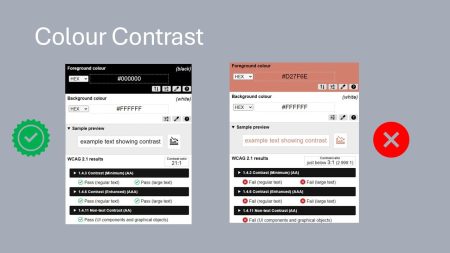
How is Colour Contrast defined?
Colour contrast is one of the most common accessibility issues out there. It’s about how different two colours appear in brightness—basically, whether the text stands out clearly from the background.
On websites, this usually means the contrast between foreground text and background colour—but it can apply to anything visual, like icons, borders, or buttons.
The technical bit? It’s measured using something called the contrast ratio:
- 3:1 or higher meets the WCAG AA standard
- Below 3:1 is a fail
Logos are exempt from the guidelines—thankfully—because let’s face it, most logos wouldn’t pass.
Testing it is easy
You don’t need fancy software or a developer. There are plenty of free tools online where you pop in your foreground and background colours, and they’ll tell you whether it passes. WebAIM’s contrast checker is a good place to start.
In the screenshots I’ve included, the contrast ratio on the right is just under 3. So it fails—just—but it still fails.
The fix? Usually very simple
Often, it only takes a tiny change—darken the text slightly, or lighten the background—and suddenly you’re back over the 3:1 threshold.
The difference might be barely noticeable to the eye, but for someone with low vision, it can be the difference between readable and unreadable.
Moral of the story: check your contrast. It takes seconds, costs nothing, and makes your content usable for far more people.



Would you like to speak with people
who understand inclusive web design?
Whether you are planning a new website, reviewing an existing platform or trying to understand your accessibility obligations, we would love to help.
Please get in touch to discuss your project, accessibility goals or digital challenges.