
Let’s talk about Links
Web audit for an NHS Trust
I have just finished an audit for an NHS Health Trust. Generally, the standard of accessibility was high from my initial checks, but when I started digging deeper with my team, we started to find some issues. This is normal and expected.
Inconsistency
One of the most common issues we come across is inconsistency. This is often found in link behaviour. Usually, a link is underlined, so that you know it is a link and when you select it, you will go somewhere else either on this website or another one. It does not have to be underlined, as long as it changes visually when you move the mouse over it or tab over with it using a keyboard.
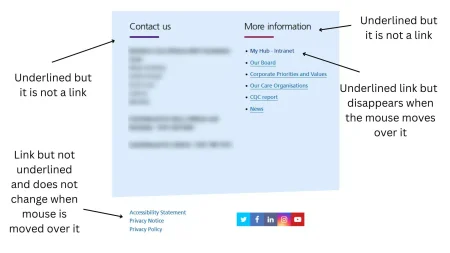
Have a look at this screenshot.
There are two words (Contact and More) which are underlined. However, they are not links.
On the right-hand side, there is a series of underlined links. The underline disappears when the mouse is moved over it. If you tab to them with a keyboard, a faint box appears around the active one.
On the bottom left, there are 3 more links, none of which are underlined and they do not change when the mouse moves over them. If you tab to them with a keyboard, a faint box appears around the active one.
Why does this matter?
If links behave differently on a website, they can be confusing for visitors, whether they are disabled or not. It can actually be quite unsettling, especially for some neurodivergent people.
Keep it simple. Keep it consistent. All your visitors will benefit.
Caption: part of a web page with several links, each set has an arrow pointing at it. Text reads “Underlined but it is not a link”, “Underlined link but disappears when the mouse moves over it” , “Link but not underlined and does not change when mouse is moved over it”
Would you like to find out more?
Watch my TED Talk
Find out more about an accessibility audit


Would you like to speak with people
who understand inclusive web design?
Whether you are planning a new website, reviewing an existing platform or trying to understand your accessibility obligations, we would love to help.
Please get in touch to discuss your project, accessibility goals or digital challenges.